The power of Filter in Spring Integration

The standard properties for  an inbound channel adapter are pretty good, you can use a filename pattern or a regex to define which files are downloaded from the remote location. This is fine for a lot of situations, but sooner or later you will want to have more control over what files are downloaded.

The clever people at Spring have thought of this too and you can replace the filename pattern or regex with a filter property (filter=”myFilter”), this allows you to specify a class implementing org.springframework.integration.file.filters.FileListFilter, in this class you filter each file available on the remote server against whatever criteria you wish and then return the list of remote files back you want to download.

My first use for this was when accessing a remote server with read only access, we did not have permission to delete files when downloaded and as such each time the server was polled, all the existing files that met the filename pattern criteria were downloaded again. How to solve this? Maintain a list of downloaded files locally and check against this in the custom filter for the all the incoming files from the remote server.

Sample FTP inbound channel config:

<int-ftp:inbound-channel-adapter
channel="ftpChannel"
session-factory="ftpSessionFactory"
filter="customFilter"
local-directory="file:/my_transfers">
remote-directory="some/remote/path"
<int:poller fixed-rate="1000"/>
</int-ftp:inbound-channel-adapter>

Sample bean configuration for filter class

<bean id="customFilter" class="org.example.CustomFilter"/>
Leave the first comment

Grails, Mercurial, Jenkins and Tomcat

Grails is a great choice for writing a webapp and focusing on the domain solutions as you get so much out of the box. One gripe I have with it is the speed of building wars, it seems very slow for what is does, but I probably don’t understand the complexity of whats involved, and I don’t want to know, that’s why I chose Grails 🙂

If you are doing regular deploys with Grails, you will soon tire of building using the command line or an IDE like Eclipse or NetBeans (I favor NetBeans for Grails development, feels more lightweight than the STS eclipse version). To solve this, lets bring in Jenkins, a great tool which allows you to automatically build and deploy software, it does a lot more than that, but this is what I want from it.

My App Server of choice is Tomcat 7.x, lightweight, simple to configure, nice! For good measure, I also have MySQL 5.x installed, it’s good to have a database around for all sorts of reasons.

Firstly perform default installs of  Tomcat and MySQL (I recommend XAMPP as an easy way of getting Tomcat + MySQL setup). Once that is complete, we now need to configure some users in TC, I want 2 separate users, one to login to the really handy ‘manager’ app that comes with TC, the other to allow scripted access to control TC, this is what Jenkins will use to deploy the war later.

Open tomcat/conf/tomcat-users.xml in your editor of choice, and modify it to look something like this:

<tomcat-users>
<role rolename="admin"/>
<role rolename="manager-gui"/>
<role rolename="manager-script"/>
<user username="admin" password="password"
roles="standard,manager,admin,manager-gui"/>
<user username="jenkins" password="jenkins"
roles="manager-script"/>
</tomcat-users>

This is creating the two roles manager-gui (for tomcat:port/manager access) and manager-script (for jenkins to deploy war’s through) Once that is complete, restart tomcat for it to take effect.

Installing Jenkins

Installing Jenkins is relatively simple, you download the war from Jenkins home page and either deploy it via the TC manager or drop it into the webapps folder inside TC install directory. Once deployed, browse to http://tchost:tcport/jenkins and you will see the Jenkins screen.

Jenkins is extensible via plugins, and we will need a few plugins to allow us to talk to tomcat, mercurial and grails. Go to the Jenkins plugins menu via “Manage Jenkins” and install the following plugins:

– Jenkins Mercurial plugin
– Jenkins Grails plugin
– Deploy to container Plugin

Once these are installed, configure the deploy plugin to point at the Tomcat ip and use the username and password as above (jenkins/jenkins), the plugin can now auto-deploy to Tomcat.

Next create a job in Jenkins that uses Mercurial as source control, you can pick any branch/Tag etc, but just leave it as default for now. Choose how often to checkout and build, choose which artefacts to archive (at a minimum you should choose the .war in target directory). Then as a post build process, choose to use the auto deploy plugin, this will push the .war file to Tomcat.

Thats it, now you have an auto-building and auto-deploying web application, ENJOY!

Leave the first comment

Rally api

Using Rally is an, emmmm, experience, not a good one though.

Sure it holds lots of information relevant to multiple software projects run in an ‘agile’ way, but what it doesn’t do, is provide a nice level of interaction. In short, Rally needs a UX person pronto, and of course developers who will listen.

Positive notes? certainly, there is a nice REST interface to Rally, hoorah! another one, this is getting good, there is also a python library provided, nice, this allows me to not rely on the web application provided by Rally, I can now use their api to get at the data I need to report on.

Now begins the task of writing something usable and useful…

Leave the first comment

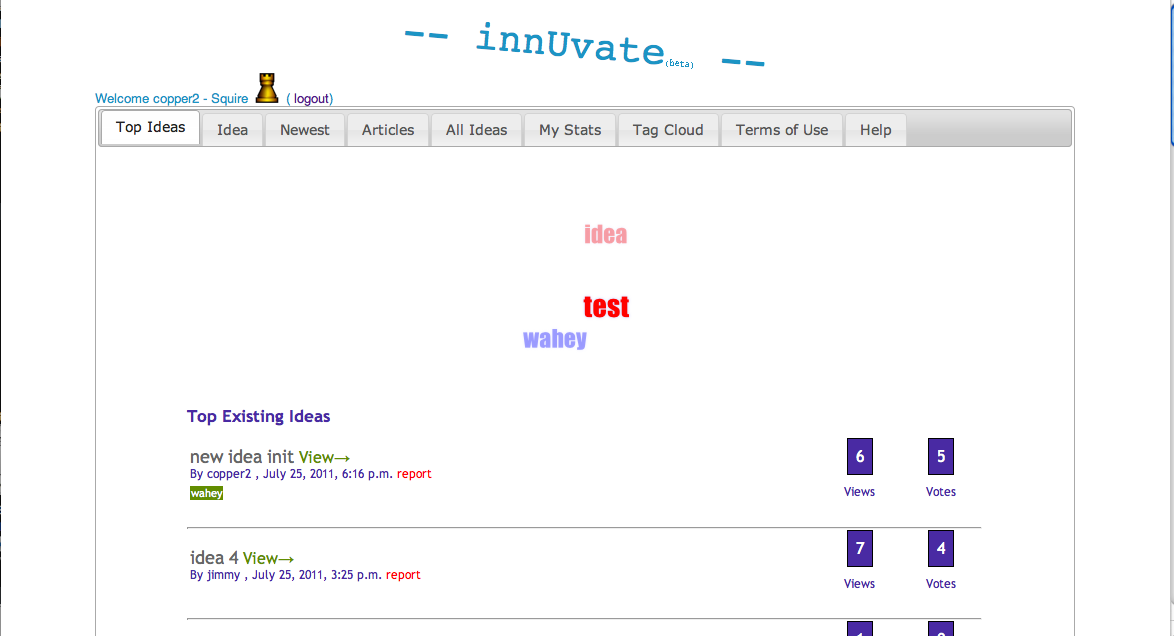
innUvate website launched

The open source innovation portal project I created was launched today, src is hosted on github (https://github.com/jamesmwhite/innuvate)

The site allows for:

– User registration and activation
– Idea submission
– Idea commenting
– Idea voting
– Tagging
– Article submission
– Article voting
– Tag based filtering
– Full statistics
– Gamification

Screenshot:


Leave the first comment

Liferay Portal

I have been messing around with Liferay community edition for a few weeks now. Initially writing simple ‘hello world’ portlets and then moving on to inter-portlet communication, blending of data, utilising Liferay’s localisation, preference, help capabilities.

What it offers ‘out of the box’ is great, a full CMS (content management system) which doubles as a portal. It includes, organisations, roles, users, theming and a number of authorisation mechanisms such as oauth. To customise it and add to it, writing portlets is a good place to start.

The portlet spec (JSR 286 http://developers.sun.com/portalserver/reference/techart/jsr168/) is really good in theory, in practice it takes a little more work, but is a good idea overall. Writing jsp’s seems a little old school in today’s world, in fact Java in general is beginning to feel a little out of date.

So I understand that soon Liferay will support scripting languages to write portlets, this will be a fantastic addition and hopefully open up the platform to a plethora of new developers. A couple of issues I ran into with portlets incase you were wondering:

– Order of loading, if portlets pass info around with session then the order they load is important, explicit control is not great for this via config etc.

– Compatibility with some modern front end UI components, had some problems with datagrids with some javascript libs.

– Eclipse IDE SDK is not good, the IDE crashes frequently with the SDK installed and does not handle importing of other peoples projects well.

I stress to add that even with the above problems, I still really like Liferay!

Leave the first comment